10 Webinar Landing Page Best Practices to Maximise Registrations
Discover key webinar landing page best practices for B2B SaaS marketing. Learn how to optimise forms, headlines, and CTAs for maximum conversion and ROI.
In the world of B2B SaaS, a webinar is more than just a presentation; it's a powerful engine for demand generation, client education, and establishing thought leadership. Yet, even the most compelling content can fail if its gateway—the landing page—doesn't convert. For marketing professionals and content teams struggling with limited resources and the constant need for high-quality content, a high-performing landing page is non-negotiable. It’s the critical juncture where prospects decide if your insights are worth their valuable time.
A poorly designed page not only loses qualified leads but also negatively impacts your brand's professional image. This guide moves beyond generic advice to provide 10 actionable webinar landing page best practices specifically tailored for B2B SaaS firms. We will explore data-driven strategies that directly address the core challenges of boosting efficiency, proving ROI, and consistently generating high-quality leads.
Each practice is designed to boost registration rates, enhance your brand’s perceived quality, and deliver a measurable return on investment. By implementing these detailed steps, you can transform your webinars from simple online events into strategic, lead-generating assets. You'll learn how to ensure your virtual event strategy delivers the consistent, high-value output your organisation expects, with efficiency gains you can track and report. Let's dive in.
1. Clear Value Proposition Above the Fold
The most critical real estate on your webinar landing page is the space a visitor sees without scrolling, often called "above the fold". One of the most vital webinar landing page best practices is to use this area to present an undeniable value proposition. This isn't just a title; it's a direct, benefit-driven promise that immediately answers the prospect's core question: "What's in this for me?". For B2B SaaS marketers, this means articulating precisely how the webinar solves a user's specific, high-stakes business problem.

A generic title like "Marketing Automation Webinar" is easily ignored. In contrast, a headline such as "Scale Your Pipeline: How to Triple MQLs with Automated Nurture Sequences" speaks directly to a marketing professional's pain points and performance goals. This approach, proven by platforms like Unbounce, is known to reduce bounce rates by up to 40% by instantly qualifying the visitor and demonstrating the return on their time investment.
How to Implement This
To craft a compelling value proposition, focus on outcomes, not just topics. Use a clear structure that combines a benefit-oriented headline with a clarifying subheadline.
- Action-Oriented Verbs: Start your headline with strong verbs like 'Scale', 'Unlock', 'Automate', or 'Master'. This frames the content as an active, results-driven experience.
- Specificity for Professionals: Clearly state the target audience or the specific challenge. For instance, "Mastering Churn Reduction for Subscription Models" is far more effective than "A Customer Success Update".
- Include Authority: Feature the main speaker's name, title, and company prominently near the headline. This immediately builds credibility and associates the value with your brand's expertise.
Key Insight: For B2B SaaS, framing the value proposition around efficiency gains, revenue growth, or competitive advantage is a powerful motivator. A headline promising to help attendees "Cut Customer Acquisition Costs by 30% with AI-Powered SEO" creates urgency and speaks directly to a critical business need. By getting this right, you ensure your most valuable prospects understand the webinar's importance before they even think about scrolling.
2. Optimised Registration Form Fields (Progressive Profiling)
A long, intimidating registration form is a primary cause of visitor drop-off. One of the most effective webinar landing page best practices is to minimise friction by optimising form fields, often using a strategy known as progressive profiling. This approach balances the need for lead data with the user's desire for a quick, seamless experience. Instead of demanding a dozen details upfront, you capture essential information on the first interaction and enrich the contact's profile over subsequent engagements.
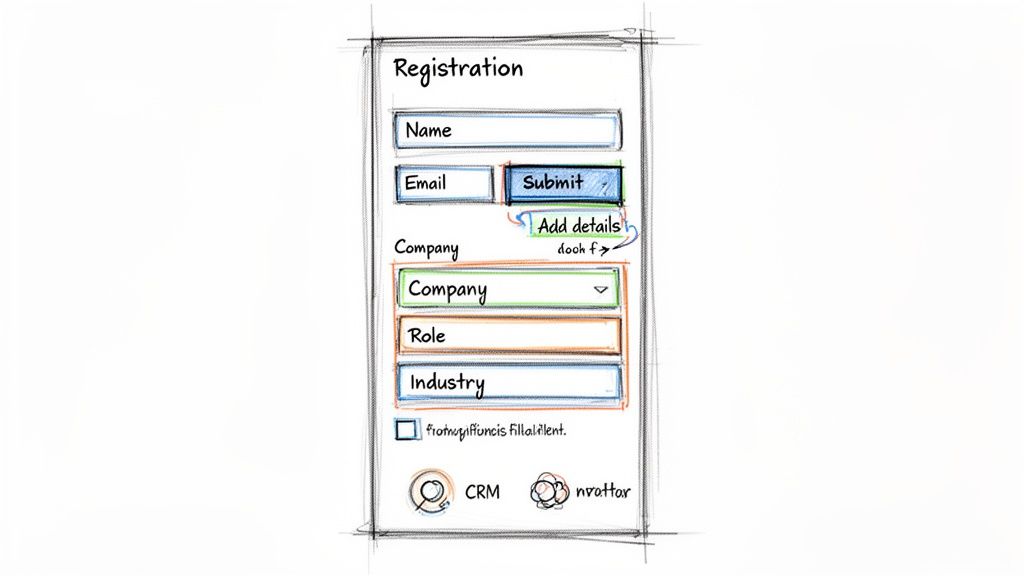
For busy marketing professionals, this is particularly crucial. A shorter initial form not only boosts registration numbers but also demonstrates respect for the prospect's time. Marketing automation platforms like HubSpot and Marketo pioneered this by dynamically showing new fields to returning visitors, gradually building a comprehensive lead profile without overwhelming them in a single session. This method is also vital for managing data privacy and ensuring compliance with regulations like GDPR. For a practical starting point, consider using a dedicated webinar registration form template that incorporates these principles.
How to Implement This
To optimise your form, prioritise only the most critical information for the initial sign-up. The goal is to lower the barrier to entry, which directly impacts attendance rates and overall campaign ROI. You can find more strategies for boosting your webinar attendance rates by focusing on user experience from the very first click.
- Limit Initial Fields: For a first-time registrant, stick to the essentials: name, work email, and company. Adding a specific field like 'Job Role' or 'Industry' can provide immediate segmentation value for lead nurturing.
- Use Smart Fields: Employ progressive profiling in your marketing automation platform to ask for new information (e.g., company size, marketing budget) when a known contact registers for a subsequent webinar.
- Ensure Compliance: Always include an explicit, unticked checkbox for marketing opt-ins. This is non-negotiable for GDPR and other privacy regulations, building trust and ensuring your communications are welcome.
- Auto-populate Data: Leverage tools like LinkedIn SSO or 'company name' lookup fields to reduce manual entry and improve data quality, creating a smoother registration process.
Key Insight: For B2B SaaS, the first form interaction is about starting a conversation, not conducting an interrogation. By asking only for what is immediately necessary, you increase initial conversion rates. Data from Salesforce shows that reducing form fields from 11 to 4 can increase conversions by as much as 120%. A minimal form demonstrates efficiency and respect, key values for professional audiences.
3. Speaker Credibility and Authority Indicators
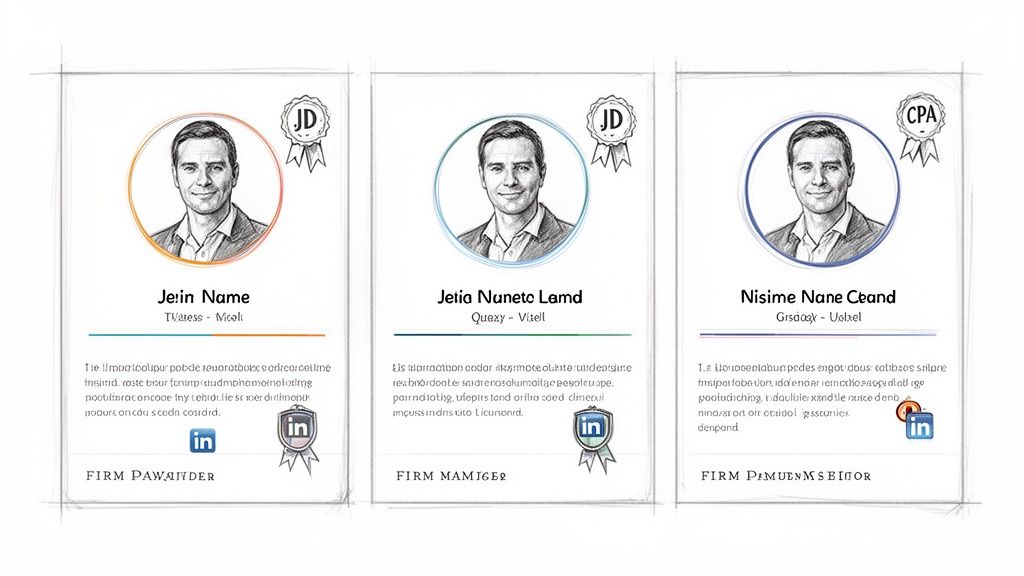
For high-value B2B audiences, the person presenting the information is just as important as the information itself. A key component of webinar landing page best practices is to prominently feature speaker credentials to build immediate trust. Your audience of marketing professionals is investing their valuable time; they need assurance that the content will be delivered by a genuine expert, not a junior salesperson. This is about transforming the webinar from a potential sales pitch into a credible thought leadership event.
This strategy has been perfected by industry leaders like Gartner and Forrester, where analyst authority is the primary draw. A webinar from HubSpot featuring a VP-level marketer carries inherent weight, just as a MarTech webinar is more compelling when presented by a practitioner with verifiable campaign results. Highlighting these indicators signals quality and reassures attendees that their time will be well spent learning from a true authority.
How to Implement This
Integrate a dedicated speaker section that is clean, professional, and easy to scan. The goal is to convey expertise quickly and effectively, encouraging registrations based on the speaker's reputation alone.
- Create a Speaker Feature: For each speaker, include a high-quality headshot, their full name, official title, and company. Accompany this with a concise two-sentence biography highlighting their most relevant experience or accomplishments (e.g., "scaled a startup from $0 to $10M ARR").
- Showcase Credentials: Explicitly list relevant accomplishments or publications. If the speaker has been featured in major industry publications like Forbes or TechCrunch, make sure this is clearly visible.
- Add Social Proof: Include a button linking directly to the speaker's LinkedIn profile. This provides an easy, third-party method for prospects to verify credentials and explore their professional history, further enhancing credibility.
Key Insight: For B2B SaaS, the speaker is the embodiment of the company's intellectual capital. Strategically showcasing their expertise and credentials is not just a trust signal; it’s a direct reflection of your brand's value. Featuring a Head of Growth who has successfully exited a previous company or who speaks at major industry conferences can significantly lift registration rates, as it promises exclusive, high-calibre insights that are not available elsewhere.
4. Agenda and Learning Objectives (Content Transparency)
Beyond an enticing headline, busy marketing professionals need to quickly qualify whether your webinar is a worthwhile use of their valuable time. One of the most effective webinar landing page best practices is to provide a clear, concise agenda and specific learning objectives. This transparency demonstrates respect for your audience's schedule and positions the content as substantive and well-organised, rather than a thinly veiled sales pitch.
For a content team considering a webinar on SEO, they want to see the specific tactics and frameworks being discussed—not just a generic promise of "better rankings". Similarly, a demand generation manager needs to see that the learning outcomes align with their MQL and pipeline goals. This approach, popularised by platforms like LinkedIn Learning, builds immediate trust and significantly boosts conversion rates by removing uncertainty.
How to Implement This
Structure your agenda to communicate value, not just logistics. Focus on what attendees will gain from each section of the presentation, framing it as a clear return on their time investment.
- Use Outcome-Focused Language: Instead of listing topics, frame bullet points with phrases like "You will learn how to...", "Discover the framework for...", or "Implement the 3 steps to...". This shifts the focus from your content to their benefit.
- Highlight Key Takeaways: For each agenda point, add a short sentence explaining the tangible skill or insight an attendee will gain. For example, "Content Repurposing: Learn how to turn one webinar into five unique marketing assets."
- Keep it Scannable: Present the agenda as a list of 3-5 high-level topics or key takeaways. Avoid overly granular, minute-by-minute breakdowns which can be overwhelming. Clearly state the total session length, including the dedicated Q&A time.
Key Insight: For B2B SaaS, content transparency is a direct reflection of product credibility. A well-defined agenda shows meticulous planning and a commitment to delivering tangible value. When a prospect sees a clear structure outlining how you will solve their problem from A to B to C, their confidence in your expertise skyrockets, making the decision to register almost reflexive.
5. Social Proof and Trust Signals (Testimonials, Attendee Logos, Stats)
For B2B marketing professionals, registration for a webinar is an investment of time and a potential risk to their team's resources. One of the most effective webinar landing page best practices to mitigate this hesitation is the strategic use of social proof. This psychological principle demonstrates that people conform to the actions of others, assuming those actions reflect correct behaviour. On your landing page, this translates into signals that communicate peer validation and industry authority, effectively de-risking the decision to register.
Instead of just telling prospects your webinar is valuable, social proof shows them. Seeing that industry leaders and direct competitors have previously attended creates a powerful sense of FOMO (fear of missing out). For example, a webinar displaying the logos of Fortune 500 companies or stating "Over 5,000 marketing leaders have registered" provides instant credibility that no marketing copy can replicate alone. This approach, popularised by B2B SaaS firms and review platforms like G2, builds trust before a visitor even reaches the registration form.
How to Implement This
Integrate social proof seamlessly into your page design, typically below the main value proposition or near the registration form, to reinforce the decision-making process.
- Curate Powerful Testimonials: Feature one or two detailed testimonials from past attendees. Include their full name, job title, company, and a professional headshot to maximise authenticity.
- Create a "Trusted By" Logo Wall: Display a selection of 8-12 prominent client or past attendee company logos. This visual cue is quickly scannable and highly persuasive, especially when featuring well-recognised industry brands.
- Leverage Specific Metrics: Quantify your success. Use data points like "Attended by 2,500+ VPs of Marketing" or "Rated 96% 'Extremely Valuable' by past attendees". Specificity is more believable than general claims.
- Obtain Consent: For B2B marketing, always obtain explicit written consent before using a client's name, testimonial, or company logo to maintain professional relationships and avoid any compliance issues.
Key Insight: The most impactful social proof aligns directly with your target audience's peer group. A testimonial from the CMO of a fast-growing tech company is far more influential for a SaaS marketing webinar than a generic five-star rating. By showcasing validation from recognisable and respected peers, you transform your landing page from a simple advertisement into a trusted industry resource.
6. Urgency and Scarcity Elements (Limited Seats, Live vs. On-Demand Positioning)
Creating a sense of urgency is a classic marketing tactic, but for B2B professionals, it must be handled with authenticity and transparency. One of the most effective webinar landing page best practices is to ethically leverage scarcity to encourage prompt registration. This isn't about creating false pressure; it's about clearly communicating genuine limitations, such as limited virtual seats for an interactive workshop or a deadline for early-bird access to special materials.
For a B2B SaaS company, this might mean positioning a live Q&A session with the product lead as an exclusive benefit for the first 100 registrants. Platforms like Eventbrite and Zoom Webinars have popularised this by showing seat availability, which motivates decisive action. The key is to balance the incentive to register now with clear information about on-demand availability, ensuring those with scheduling conflicts still see value in signing up for the recording. This approach respects the prospect's time while optimising registration velocity.
How to Implement This
To effectively use urgency, focus on genuine limitations and added value for live attendees. This builds anticipation without resorting to deceptive tactics.
- Highlight Live-Only Benefits: Clearly articulate what attendees gain by being there in real-time. Use phrases like, "Live Q&A with our Head of Product" or "Exclusive access to our new feature demo during the live session".
- Be Specific About Limitations: Instead of vague statements, use concrete numbers or dates. For example, "Only 50 seats remaining for this interactive workshop" or "Register by Friday to receive the pre-webinar strategy template".
- Clarify On-Demand Access: State exactly when and how the recording will be available. For example, "Can't make it live? Register anyway and we'll send you the full on-demand recording and slide deck within 24 hours".
- Use Countdown Timers Sparingly: Add a countdown timer to the page only within the final 48-72 hours before the event to maximise its impact without causing annoyance.
Key Insight: For B2B SaaS, the most powerful and ethical urgency driver is exclusive access to experts. Emphasise this on the registration page: "This is your only chance to ask our lead data scientist your questions live". This is a legitimate and compelling reason for marketing professionals to prioritise attending the live event, directly tying registration urgency to a tangible competitive advantage.
7. Mobile-Responsive and Accessibility Design (Compliance + Conversion)
In today's professional landscape, decision-makers are constantly on the move, often reviewing invitations and registering for events from their smartphones. One of the most critical webinar landing page best practices is ensuring your page is flawlessly mobile-responsive and accessible. A poor mobile experience can lead to an immediate exit, with data showing that over 50% of B2B traffic now comes from mobile devices. This is a dual imperative: optimising for conversion and adhering to modern web standards.
This goes beyond just making text readable on a small screen. It involves a "mobile-first" design philosophy, popularised by Google's indexing priorities, and a commitment to accessibility standards like WCAG 2.1 AA. An accessible design not only caters to users with disabilities but also improves the experience for everyone, signalling that your company is inclusive and detail-oriented. Platforms like Salesforce and HubSpot build their event pages with these principles at their core, recognising that a seamless registration process on any device is non-negotiable.
How to Implement This
To achieve a high-converting design, you must test and build with both mobile users and accessibility in mind from the start. This prevents costly retrofitting and protects your brand's reputation.
- Prioritise Vertical Flow: On mobile devices, ensure all elements, especially form fields, stack vertically. This prevents awkward horizontal scrolling and simplifies the registration process.
- Implement Accessibility Checks: Use tools like Google's Mobile-Friendly Test and built-in accessibility checkers in platforms like WordPress or Webflow. Ensure all images, including speaker headshots and logos, have descriptive alt text.
- Enhance Video Content: If your page includes a promotional video, provide captions. This not only meets accessibility standards but also caters to users viewing in sound-off environments. Understanding the hidden power of captions can significantly boost engagement.
- Test Keyboard Navigation: Ensure a user can navigate and complete the entire registration form using only the 'Tab' key. This is a fundamental test of accessibility.
Key Insight: For B2B SaaS companies, WCAG 2.1 AA compliance is not just a best practice; it's a competitive advantage. Demonstrating a commitment to digital accessibility can differentiate your brand, particularly when selling into enterprise or public sector organisations, all while maximising your webinar's reach and impact.
8. Compelling Visual Design (Branded Templates, Professional Graphics)
For B2B SaaS companies, visual design on a webinar landing page is a delicate balance. It must be modern and engaging enough to drive conversions, yet it must also project the stability, trust, and innovation that underpins your brand. One of the most impactful webinar landing page best practices is to establish a compelling visual identity that reinforces your company's credibility from the first glance. This means moving beyond generic templates to create a cohesive, on-brand experience that seamlessly guides a visitor from the page to the webinar itself.
Firms like Salesforce and Slack excel at this, using a distinctive visual language with professional illustrations, consistent typography, and a strict colour palette that feels both premium and authoritative. This isn't just about aesthetics; a well-designed page increases perceived legitimacy and reduces friction in the registration process. When a prospect lands on a page that looks professional and aligns with the brand they know, trust is immediately established, making them more likely to convert.
How to Implement This
To achieve a professional and compelling design, focus on brand consistency and creating a clear visual hierarchy that directs attention towards the registration form.
- Use Branded Templates: Create a master template for all webinar landing pages in a tool like Unbounce or HubSpot. This ensures consistency in logo placement, colour schemes, and font usage, saving time and preventing brand dilution.
- Invest in Professional Graphics: Avoid generic stock photos. Use high-resolution, professional headshots of your speakers and consider custom graphics or illustrations that reflect the webinar's topic. This signals quality and investment.
- Align Page and Video Branding: Ensure the visual identity of your landing page—colours, fonts, and logos—matches the branding within your webinar slides and video player. This creates a unified and professional experience for attendees.
- Strategic Use of Colour: Limit your palette to 3-4 primary brand colours to maintain a clean, uncluttered look. Use a high-contrast colour for the Call-to-Action (CTA) button to make it stand out against the background.
Key Insight: For marketing leaders in B2B SaaS, the visual design is a direct reflection of the product's quality. A cluttered, off-brand, or amateur-looking landing page can subconsciously signal a low-quality webinar, undermining your content before it's even seen. By codifying your visual approach in a brand guidelines document for webinars, you empower your team to execute flawlessly, ensuring every touchpoint communicates professionalism and boosts conversion rates.
9. Strategic Email Nurture and Reminder Sequences
A conversion-optimised landing page is only the first step; the ultimate goal is not just registration but high attendance and engagement. One of the most impactful webinar landing page best practices is implementing a multi-touch email sequence that nurtures registrants from the moment they sign up until after the event. This automated workflow keeps your webinar top-of-mind, builds anticipation, and significantly boosts live attendance rates, often by 20-40%.
For B2B SaaS companies, this sequence is a critical brand touchpoint, reinforcing the value promised on the landing page and providing opportunities for content repurposing. Platforms like HubSpot and Marketo have popularised these automated workflows, which not only drive attendance but also create opportunities to segment and re-engage leads who couldn't make the live session. To maximise the return on your webinar efforts, it's crucial to implement strategies that teach you how to reduce no show appointments effectively.
How to Implement This
An effective nurture sequence requires careful timing and messaging, moving from confirmation to urgency and, finally, to post-event follow-up.
- Immediate Confirmation: Send an automated email within one hour of registration. It should confirm their spot, restate the core value proposition, and, most importantly, include an '.ics' calendar file to add the event to their diary with one click.
- Structured Reminders: Schedule a sequence of reminders. A common, effective cadence is one week before, 24 hours before, and one hour before the webinar starts. Use the final email to create urgency with a subject line like, "Starting in 1 hour: Scale Your Pipeline".
- Post-Webinar Segmentation: Follow up with attendees within 24 hours with a link to the replay and a thank-you note. For non-attendees, send a separate email within 48 hours offering the on-demand recording, framing it as a "can't-miss" resource and a key piece of your content repurposing strategy.
Key Insight: For SaaS companies targeting global audiences, email compliance is non-negotiable. Ensure your entire sequence adheres to GDPR and CAN-SPAM regulations, particularly regarding consent and opt-out mechanisms. Including a clear, concise privacy policy link in the footer of every email is a simple way to maintain trust and avoid significant legal penalties, especially when communicating with high-value prospects.
10. Analytics, Tracking, and Performance Optimisation (Dashboard Metrics)
Creating a high-performing landing page is not a one-time task; it is an iterative process driven by data. One of the most crucial webinar landing page best practices is implementing comprehensive analytics and tracking to measure, analyse, and continuously optimise every stage of your webinar funnel. This data-driven approach moves you from guessing what works to knowing what works, ensuring your marketing efforts deliver a measurable return on investment. For B2B SaaS marketing teams, tracking performance from the first click to post-event engagement is key to demonstrating value and securing budget.
Without analytics, you are operating in the dark. Platforms like Google Analytics, HubSpot, and Marketo allow you to see exactly how visitors interact with your page, where they drop off, and which elements drive conversions. This is not just about vanity metrics; it’s about understanding user behaviour to make informed decisions. For example, knowing your landing page converts at an industry-average 25% but your attendance rate is only 40% tells you the problem lies in your post-registration communication, not the page itself.
How to Implement This
Start by defining clear Key Performance Indicators (KPIs) before your campaign goes live. Integrate your landing page with analytics tools to track the entire user journey and set up a regular review cadence to act on the insights you gather.
- Establish Core KPIs: Define success metrics upfront. Aim for a landing page conversion rate of 25-40%, an email open rate of 40-50%, and an attendance rate (attendees vs. registrants) of 60-75% for a well-targeted B2B audience.
- Implement Event Tracking: Use Google Analytics 4 or your marketing automation platform to set up event tracking for form submissions, button clicks, and video plays. This provides granular data on what elements are most effective.
- A/B Test Systematically: Test one variable at a time to achieve clear results. Start with high-impact elements like the headline, the call-to-action (CTA) button copy, or the number of form fields.
- Track Post-Webinar Engagement: Use a platform like Cloud Present to measure how attendees engage with repurposed assets, like on-demand recordings or downloadable summaries, to understand the full ROI of your content. You can learn more by mastering webinar analytics and its impact on your content strategy.
Key Insight: For marketing leaders in B2B SaaS, the true power of analytics lies in connecting landing page performance to business outcomes. By tracking metrics like Marketing Qualified Leads (MQLs) generated or pipeline influence from registrants, you can move the conversation from "how many people registered?" to "how much revenue did this webinar generate?". This transforms the webinar from a simple marketing activity into a proven revenue-driving engine.
Top 10 Webinar Landing Page Best Practices Comparison
| Item | Implementation complexity | Resource requirements | Expected outcomes | Ideal use cases | Key advantages |
|---|---|---|---|---|---|
| Clear Value Proposition Above the Fold | Low–Medium — copy + layout, requires A/B testing | Copywriter, designer, CRO tools | Higher form completions, lower bounce, improved SEO relevance | Gated webinars, executive audiences, professional services | Immediate clarity of ROI; faster decision to register |
| Optimized Registration Form Fields (Progressive Profiling) | High — conditional logic and CRM workflows | Marketing automation/CRM, developer, legal/privacy review | Higher completion rates over time, richer lead data | Recurring webinar series, compliance-sensitive registrations | Reduces friction initially while building data over time |
| Speaker Credibility and Authority Indicators | Low–Medium — content collection and placement | High-quality photos, bios, designer, compliance check | Increased registrations, stronger trust and thought leadership | Expert-led events, regulated industries (legal/finance) | Signals expertise and differentiates content quality |
| Agenda and Learning Objectives (Content Transparency) | Medium — requires content planning and alignment | Subject-matter experts, editor, possible compliance review | Higher intent registrations, reduced no-shows, better satisfaction | CPE/CLE credit sessions, technical or educational webinars | Sets clear expectations and demonstrates substantive value |
| Social Proof and Trust Signals (Testimonials, Logos, Stats) | Medium — gathering and validating proof points | Post-event data collection, legal consent, designer | Higher conversion from new audiences, greater peer validation | New series launches, B2B procurement influence situations | Leverages peer credibility to overcome hesitation |
| Urgency and Scarcity Elements (Limited Seats, Live vs On‑Demand) | Low–Medium — timing/UI elements and truthful limits | CMS/JS for timers, marketing copy, capacity tracking | Accelerated registrations, improved reminder engagement | Limited-capacity events, time-sensitive offers, live Q&A sessions | Encourages immediate action when used transparently |
| Mobile‑Responsive and Accessibility Design | High — development, testing, WCAG compliance | Front-end developers, QA, accessibility specialist | Higher mobile conversions, legal compliance, lower bounce | Broad audiences, public sector, accessibility-mandated contexts | Inclusive access, SEO benefit, reduces lost mobile traffic |
| Compelling Visual Design (Branded Templates) | Medium — professional design and templating | Designer, brand assets, photography/video resources | Increased perceived credibility and conversion | Brand-driven webinars, thought leadership, client-facing events | Reinforces brand trust and improves user engagement |
| Strategic Email Nurture and Reminder Sequences | Medium–High — workflow design and personalization | Email platform, copywriter, marketer, calendar assets | Higher live attendance, increased replay views, measurable engagement | Any webinar aiming to maximize live attendance and follow-up | Drives attendance and provides multiple nurture touchpoints |
| Analytics, Tracking, and Performance Optimization | High — tracking, attribution, dashboarding | Analytics/BI tools, integrations, data analyst | Clear KPIs, ROI measurement, continuous optimization | Scaling webinar programs, cross-channel marketing | Enables data-driven decisions and campaign improvement |
Transform Your Webinars into a Strategic Growth Engine
We have journeyed through the critical components that elevate a simple registration page into a high-performance conversion asset. From establishing a crystal-clear value proposition above the fold to leveraging the psychological power of social proof and urgency, each element plays a distinct and crucial role. The core principle underpinning all these webinar landing page best practices is a profound respect for your audience's time and intelligence, coupled with a strategic focus on demonstrating your brand's authority.
Mastering these practices is not about ticking boxes; it is about building a predictable and scalable demand generation engine. A well-optimised landing page acts as the gateway to your expertise. It sets the stage, manages expectations, and assures potential attendees that their investment of time will yield significant returns, whether that's new knowledge, actionable insights, or a fresh perspective on a complex industry challenge. This initial touchpoint is your first, and often most important, opportunity to reflect the quality and professionalism of your brand.
From Good to Great: Key Takeaways for Immediate Impact
To distil our comprehensive list into actionable priorities, focus on these pivotal areas first:
- Clarity Above All: Can a visitor understand the webinar's core benefit within five seconds? Your headline, sub-headline, and call to action must work in perfect harmony to answer the "what's in it for me?" question instantly.
- Build Unshakeable Trust: Integrate speaker credentials, attendee logos, and specific testimonials. For B2B audiences, credibility is not a "nice to have"; it is the currency of conversion.
- Remove All Friction: Simplify your registration form by using progressive profiling. Ensure your page is impeccably responsive on mobile devices, and make your agenda and learning objectives transparent and easy to scan. Every hurdle you remove directly increases your registration rate.
- Measure and Optimise: You cannot improve what you do not measure. Implementing analytics and A/B testing, even on a small scale, transforms your strategy from guesswork into a data-driven process of continuous improvement, proving ROI.
Your Next Step: From Theory to Strategic Implementation
Implementing these webinar landing page best practices consistently is the difference between hosting sporadic, one-off events and running a strategic webinar programme that delivers measurable ROI. The ultimate goal is to create a seamless, professional experience from the very first click on the landing page through to the final "thank you" slide and beyond. By treating each landing page as a strategic asset, you not only boost attendance but also enhance your brand's reputation as a thought leader.
The journey doesn't end with a successful registration. It marks the beginning of a relationship. The quality, design, and user experience of your landing page are a direct reflection of the value you promise to deliver in the webinar itself. Get this crucial first step right, and you will have built a powerful, reliable pipeline for customer education, lead generation, and business development that strengthens your brand and fills your funnel.
Ready to elevate your entire webinar programme from planning and promotion to professional production and repurposing? Cloud Present acts as your strategic partner, managing every technical and strategic detail so your subject matter experts can focus solely on delivering world-class content. Discover how Cloud Present can transform your webinars into a high-performance content engine today.


